

THE TAKEAWAYS
What to take away
- Separate timestamp syntax from business-date meaning and define start-inclusive, end-exclusive periods.
- Keep scheduled time separate from actual start and completion; preserve the target period on retries.
- Distinguish event time from arrival time and agree how late records are handled.
- Assume duplicate delivery is possible and design a run ledger and result reconciliation.
EDITORIAL PRACTICE
A morning schedule does not define the data being processed
A request to run an AI summary every morning in Japan defines timing, not the data period. A source may use UTC, the interface Japan time and a report the previous business date. Correcting display alone does not establish that extraction and retries target the same period.
A delayed job that derives its target from the current date may read different periods on its first attempt and retry. Execution can succeed while writing yesterday’s result into today’s report. Timestamp correctness and business meaning need separate checks.
This article concerns the period contract of a daily job, rather than general handover across human time zones. Separate triggering, data acceptance, completion and reruns so the interface and ledger identify the same target. All cutoffs, fictional figures and tests below are editorial proposals, not universal business deadlines.
Ask which period a result represents before asking when it runs. If stakeholders disagree, do not finalise the schedule first. Accounting month, shop operating date and source-system date may differ. Let the business choose the meaning, then pass that definition into processing.
EDITORIAL PRACTICE
Separate the standards from business decisions
RFC3339 defines a timestamp syntax including date, time and UTC offset [1]. A conforming value does not automatically reveal whether a report concerns yesterday or which cutoff finalised it. Adopting a format and defining a daily process are different tasks.
Cloud Scheduler documents a default UTC time zone and possible daylight-saving anomalies because it uses wall-clock time [2]. It also documents at-least-once delivery and original scheduled-time information retained across retries [3]. These are service-specific facts, not universal cron or queue behaviour.
The business must choose the calendar, boundaries, late-data policy and completion criteria. Standardising infrastructure on UTC does not make those decisions. Nor does a Japan-based business date require every stored instant to become a local-time string.
Keep provider facts separate from company policy in the specification. Record source and check date for the former, decision owner and version for the latter. This makes both external documentation changes and internal cutoff changes traceable without misclassifying them as platform failures.
EDITORIAL PRACTICE
Step 1: give five different times different names
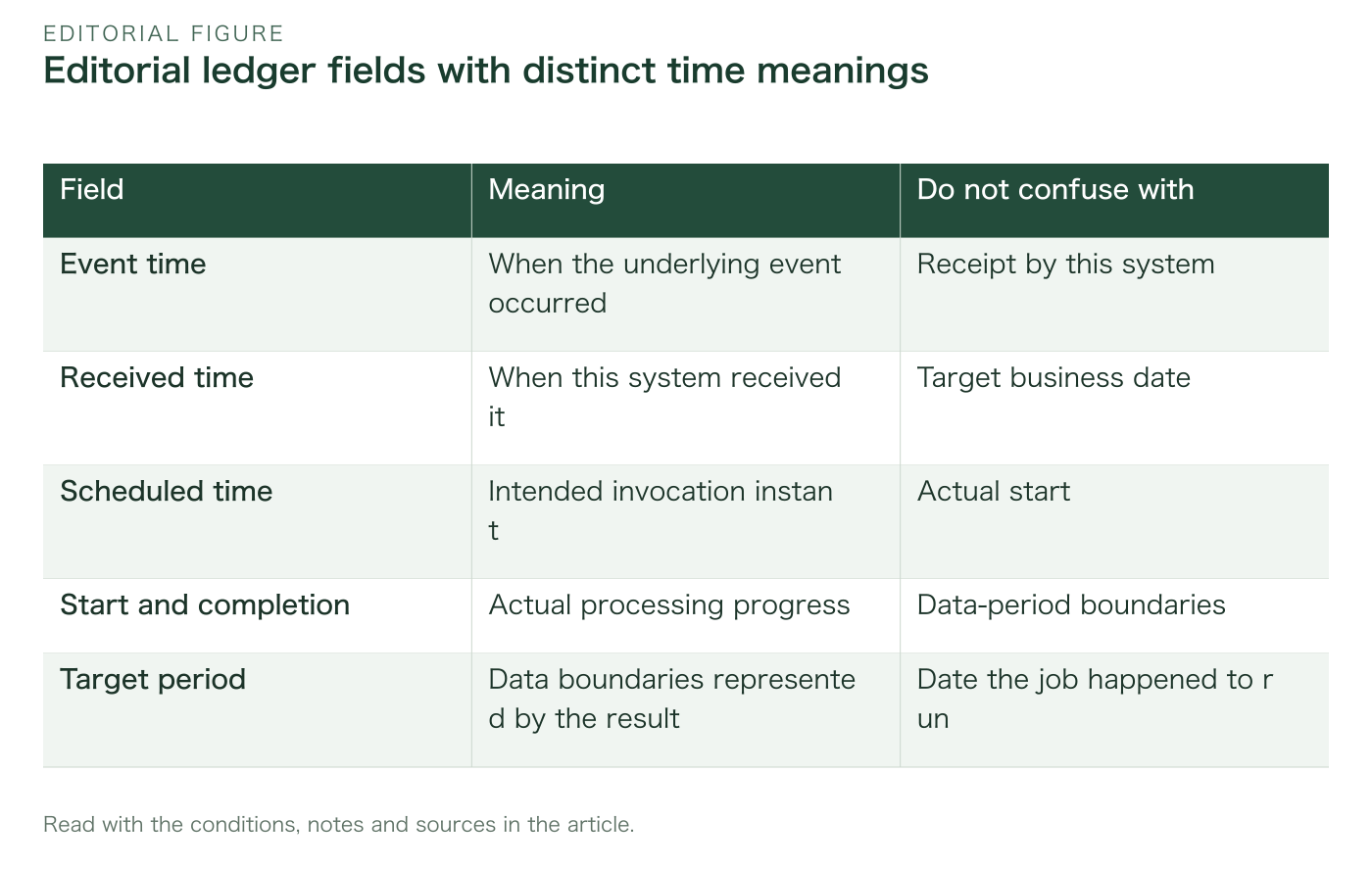
Keep event time, received time, scheduled execution, actual start and completion as separate fields. One overloaded createdAt cannot explain where delay occurred. Names can follow existing conventions, but each meaning must be explicit.
Distinguish a source-generated event time from user-entered time. Received time is your system’s observation. Source clocks may differ, so event time alone does not measure arrival delay. Different values are not automatically an error.
Separate planned from actual execution for delay and retry analysis. A midnight plan starting in the morning does not automatically move the target to the current date. Completion time describes the run ending, not the data period ending. Keep labels visible in result screens.
Add target-period start and end to separate business results from operating history. More fields may seem cumbersome, but are clearer than one value carrying several meanings. Interfaces can show a useful subset while the ledger preserves boundaries. Simplicity should not destroy the original meaning.
Read the table as text
| Field | Meaning | Do not confuse with |
|---|---|---|
| Event time | When the underlying event occurred | Receipt by this system |
| Received time | When this system received it | Target business date |
| Scheduled time | Intended invocation instant | Actual start |
| Start and completion | Actual processing progress | Data-period boundaries |
| Target period | Data boundaries represented by the result | Date the job happened to run |
EDITORIAL PRACTICE
Step 2: define the business-date label and its period
Define a date label together with the start and end it represents. In a fictional example, business date 2026-11-07 covers 03:00 on 7 November through, but not including, 03:00 on 8 November at UTC+09:00. This illustrates a label differing from midnight boundaries, not a universal 3am recommendation.
A start-inclusive, end-exclusive interval reduces double inclusion at boundaries. The interface and query must agree on inclusivity. Inventing a final second by truncating fractions can miss finer precision. Define the shared boundary as the next period’s start instead.
Retain the calendar’s regional identifier and the actual boundary instants. One observed UTC offset is not a rule for every future date. A recurring local-calendar schedule and a stored fixed instant need different information. Standardise the team’s date-time handling.
Check agreement across interface, calculation and manual reports. If departments mean different things by a target date, consider separate business-date concepts before forcing uniform terminology. Do not conceal a real business distinction by matching names. Have stakeholders read the boundaries of one concrete example.
EDITORIAL PRACTICE
Step 3: freeze the target period at admission
At admission, determine the business date, boundaries and policy version and pass them into processing instead of recalculating from now on every attempt. Crossing midnight during processing must not change the work’s target. Boundary instants preserve what was read even if display locale changes.
2026-11-07 00:30 at UTC+09:00 equals 2026-11-06 15:30 UTC. In this arithmetic example, using the UTC date substring as the business date shifts it by a day. Identify the instant and business conversion rather than slice a string. Correct timestamp syntax alone does not prevent that mistake.
If scheduled time determines the period, define its trusted source. For Cloud Scheduler, authenticate the legitimate caller before using job name and original scheduled time [3]. A header’s presence does not authorise any caller. Delivery identity and execution authority are different checks.
Preserve the frozen period on retries. A different period is a new request, not an automatic update to the old one. Showing execution time alongside target period helps users recognise a late-completing previous-day result.
Test the same instant expressed with different offsets. Different-looking strings need not mean different events. Conversely, matching date labels can represent different periods under different regions or policies. Check display equality and period equality separately.
EDITORIAL PRACTICE
Step 4: separate data acceptance from completion deadline
A data cutoff determines what enters this result. A completion deadline determines when that result must become usable. Do not combine them merely because both occur in the morning. Separating waiting for data from processing makes delay ownership clearer.
Define complete too: an AI response received, or fields validated, saved and available to readers? If notification delivery is included, retain its confirmation separately. One success flag obscures a saved result with delayed notification.
Choose which clock decides near-cutoff inclusion: event or received time. The answer changes the dataset. Agree how source timestamp corrections are handled rather than hide a rule such as include everything labelled yesterday inside code.
Choose a policy for overdue work: stop, publish a provisional version or continue with a delay label. Continuing computation differs from creating additional side effects after publication. Missing a deadline does not justify silently shrinking the period or rewriting the completion time.
EDITORIAL PRACTICE
Step 5: classify late arrivals before assigning them elsewhere
Late data includes events occurring within the period but arriving later, corrected event times and duplicates discovered later. These need not share one after-cutoff policy. Identify affected results and whether a published report needs correction. Backdating receipt erases what happened.
An editorial approach preserves source data and arrival facts while recording the adopted period and policy separately. Some workflows defer to the next day; others issue a correction for the prior day. Make the chosen meaning readable. Treat a later policy change as a new version without deleting the old result’s assumptions.
A grace period must not become indefinite waiting. Define when provisional becomes final and what establishes completeness: a source completion notice, a deadline or a combination. Missing data is not the same as a real zero.
An interface can show target period, data-as-of time and provisional/final status without exposing every internal timestamp. Conditions affecting meaning should remain visible. Explaining a changed previous-day number is essential to using daily AI processing in business.
Zero records can mean a genuinely empty, complete dataset or that nothing has arrived yet. The former may be final; displaying the latter identically prevents interpretation. Show zero alongside completion state and data-as-of information.
EDITORIAL PRACTICE
Step 6: preserve the target and side-effect identity on retry
Carry the same logical identity and target period into a retry, with separate start, finish and error records for each attempt. One logical summary may have several attempts. Distinguishing job identity from attempt identity explains what finished and what can be repeated.
Separate recalculation from repeating a side effect such as sending or charging. A generation failure differs from a completed send with a lost response. Do not interpret an unknown result as zero successful sends and create another. Preserve an external reference for reconciliation.
Scheduled-delivery information helps identify duplicates but does not fully define business uniqueness. Specify which customer, operation, period and policy version constitute the same work. Too broad a key suppresses distinct work; too narrow a key admits duplicates.
A rerun interface should show the original period, prior state and side-effect reconciliation, not simply default to today. Distinguish retrying the same work from issuing a corrected version. Record operator intent and check authority on execution rather than use an old action log as permission.
EDITORIAL PRACTICE
Do not equate a local calendar day with 24 elapsed hours
A recurrence at the same local clock time differs from a fixed elapsed interval. In daylight-saving regions, a local calendar day does not always match an assumed 24 hours. Cloud Scheduler documents this wall-clock issue [2]. Decide which recurrence the business needs after checking the platform.
Adding 24 hours to one boundary instant may not produce the next local-calendar cutoff. Calculate the next boundary using the region’s rules where a local day is intended. Do not turn one historical offset into a permanent regional rule. Retain date-time library or rule-data versions where reproducibility requires them.
Test repeated and nonexistent local times using real data for the selected region rather than invented future change dates. Decide whether automatic adjustment or an explicit error suits the business impact.
Even a UTC-triggered schedule still needs a regional meaning for the business period. Trigger stability and user-facing date semantics remain separate. Recheck agreement across extraction, interface, notifications and rerun screens after a change.
EDITORIAL PRACTICE
Month end and holidays are additional business rules
Calendar month end, banking business day and internal report finalisation may differ. A cron expression does not establish those meanings. If a business-day calendar is needed, choose its source and update owner.
Skipping execution on a holiday also needs a data-period policy. The skipped period may still matter. If the next run handles several periods, decide whether results remain separate or combine, while retaining meaningful comparison for users.
A retry across month end should not silently adopt the current month. For cost or billing preparation, explain where later-processed prior-month data belongs. This article does not let a developer decide accounting or legal recognition; it concerns preserving the period chosen by the business owner.
Do not silently redisplay old results under a changed calendar. Preserve the distinction between prior and current cutoff rules. A historical recalculation needs its own scope and version approval. Traceable assumptions matter more than convenient rewriting.
EDITORIAL PRACTICE
Fictional case A: a retry after the 3am boundary
In a fictional shop summary, business date 7 November covers 03:00 that day until 03:00 on 8 November, exclusive. Processing after closing fails and retries in the morning. The calendar date is 8 November, but the target remains the original 7 November period. Merely saying subtract one day conceals the cutoff policy.
A frozen admission period lets the retry reuse the same boundaries. Record original schedule, attempts and result version, distinguishing save and notification states. Display a 7 November result completed in the morning rather than only the execution date.
Separate retrying unchanged input from recalculating after late input. The latter involves a changed dataset or correction policy. One undifferentiated rerun button hides intent. Make the distinction visible in both screen and ledger.
Test by changing the current time between attempts while preserving boundaries. Also simulate a lost response after saving and check that side effects do not multiply. One on-time success does not establish this property. Acceptance must include semantic stability during delayed operation.
EDITORIAL PRACTICE
Fictional case B: an event before cutoff arriving afterwards
In another fictional example, an event occurs just before cutoff but arrives afterwards. Event-time selection may associate it with the prior period; receipt-based finalisation may exclude it from that run. Infrastructure alone cannot choose the correct policy. Ask the business how source delays occur.
If issuing a prior-period correction, retain version, reason, added records and differences instead of silently overwriting. If someone already used the report, decide how the change reaches them. Avoid changed numbers with stale notifications or downloaded documents.
If deferring to the next day, preserve both event date and assigned business date. Do not rewrite the event time to make them agree. Equal-length periods may contain different late-arrival effects; notes or separate totals may be useful. Implementation convenience should not hide business meaning.
Test event and receipt combinations immediately before, exactly at and after the boundary, including fractional precision where supported. Test repeat delivery and timestamp corrections separately. Agree concrete ambiguous cases rather than only simple matching dates.
EDITORIAL PRACTICE
Do not silently apply configuration changes to in-flight work
When changing cutoff or region, define when the new policy takes effect. Explicitly decide whether admitted old-policy work finishes or is replaced. Rereading current settings halfway through and changing only boundaries mixes assumptions within one job.
Keep the version used to determine the period. Separate wording edits from changes to boundaries or late-data rules. Not every change needs recalculation, but changes affecting numeric meaning need a decision owner and applicable periods.
On resumption, check whether an old policy may still be used: does the target remain needed, is data retained and is authority for side effects still valid? Preserving scheduled time is not perpetual permission to execute a stale request.
Scope implementation work to connect configuration history with the run ledger, not only a settings screen. Include traceability after staff handover. Acceptance should examine consistency with existing work after a change, not merely the ability to edit settings.
A manual period selector should show the prior value for review. If the new period differs from the original retry, identify that change and record a new request. Reusing the old identity for changed contents undermines later duplicate checks and reconciliation.
EDITORIAL PRACTICE
Put boundary, duplicate and delay tests on one sheet
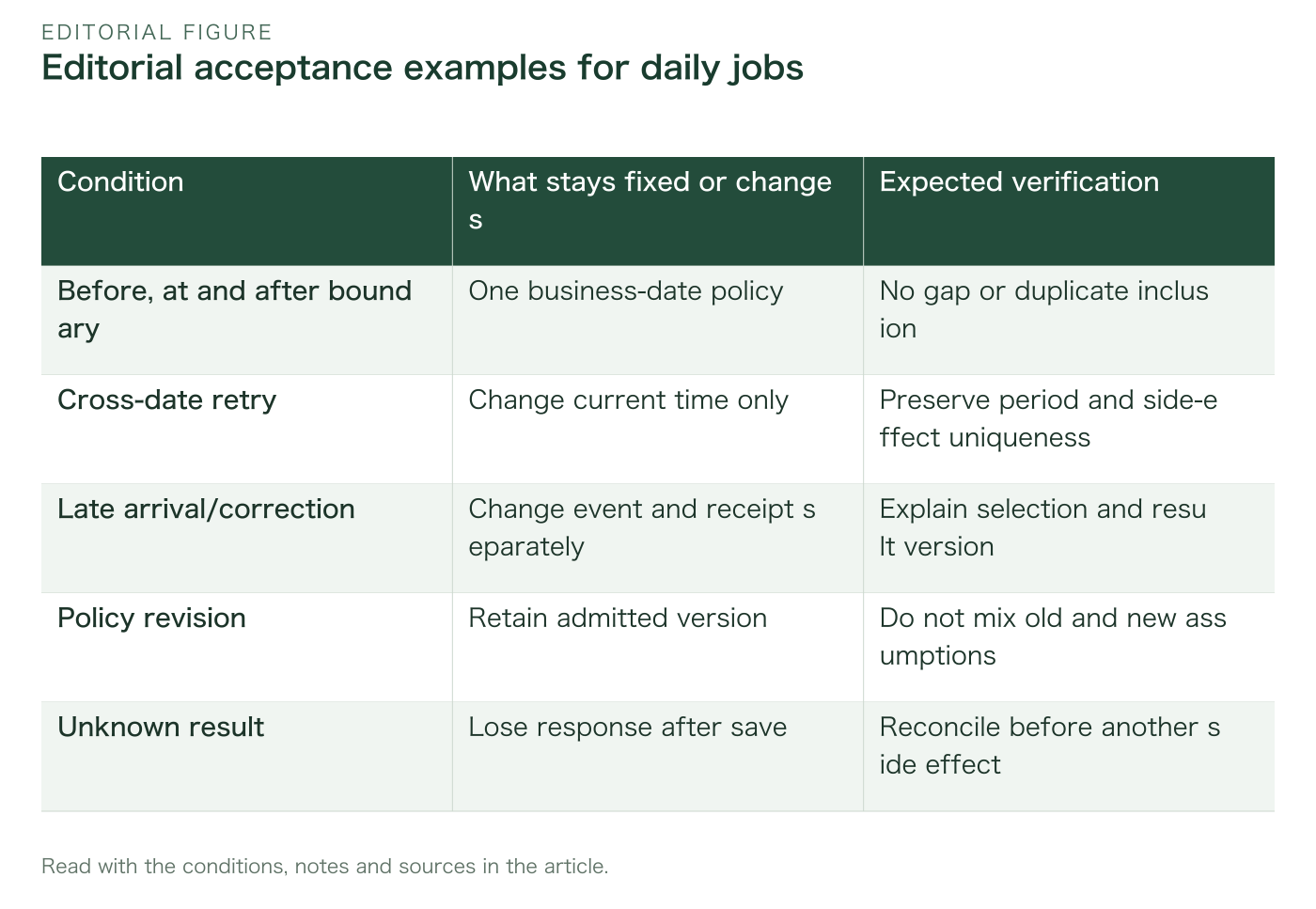
Acceptance should cover boundary inputs, cross-date retries, month end, daylight-saving behaviour in the selected region and configuration changes. Isolate conditions rather than change all at once. Agree a few concrete inputs and expected outcomes with the business before automating them.
Expected outcomes include period, selected data, result version, side-effect count and user display. HTTP success is insufficient. Equal counts can still come from different periods, so check boundaries and identifiers too. Finishing execution differs from finishing the correct work.
Use fictional records for boundary tests rather than copying personal information or secrets. Any necessary real-data validation belongs in a separately authorised scope. Reports can retain version and match evidence without exposing every value. Separate verified coverage from untested conditions.
After acceptance, monitor planned-versus-actual differences. For a delayed run, first check preserved target, duplicate effects and completion meaning. Delay alone does not prove total failure; a success response alone does not prove business correctness.
Read the table as text
| Condition | What stays fixed or changes | Expected verification |
|---|---|---|
| Before, at and after boundary | One business-date policy | No gap or duplicate inclusion |
| Cross-date retry | Change current time only | Preserve period and side-effect uniqueness |
| Late arrival/correction | Change event and receipt separately | Explain selection and result version |
| Policy revision | Retain admitted version | Do not mix old and new assumptions |
| Unknown result | Lose response after save | Reconcile before another side effect |
EDITORIAL PRACTICE
Hand over more than a cron expression
Handover should include schedule, region, business-date definition, boundaries, late-data policy, rerun procedure and owners. A copied cron expression does not explain why that time processes that period. A result should lead back to its run and policy after staff change.
Differentiate missing source data, no start, slow AI response and delayed notification after saving. Investigation owners differ. Let staff find the relevant state from result identity and period instead of requiring users to explain the architecture each time. Align responsibilities with interface labels.
For a VERSAROC inquiry, evidence identifying screen, target period and affected run is more useful than dates are wrong alone. Start from current flows and responsibility boundaries rather than assume a complete rebuild. This article promises no unverified outcome or saving percentage.
Keep ordinary and exception operation traceable in the same ledger. A separate manual rerun sheet fragments the history that matters most. A useful deliverable lets the operator explain which period is final and what remains unconfirmed, rather than merely whether a button was pressed.
EDITORIAL PRACTICE
The next step is to read one day’s boundaries together
Start with one real business day rather than implement every time-zone exception immediately. Draw period, data cutoff, scheduled time and completion deadline on one sheet. Place a few event and arrival examples and ask owners which result includes each. Disagreement identifies a decision needed before coding.
Add delayed start, cross-date retry and a late correction one at a time, using conditions from real operational difficulties. Check for repeated target derivation from now and duplicate effects after unknown outcomes. Preserving meaning matters more than accumulating exception rules.
Timestamp format, scheduler, queue and interface have different roles. Correctness of one setting does not define the whole business date. Read external specifications, state company policy and carry its version into execution. That removes today from staff-specific assumptions.
WITH OPERUN.
Delegate everyday AI management.
Aim for operation that explains its work despite delay or duplication, rather than merely hopes for exactly one on-time execution. Separate target from actual times, retry from correction and unknown from confirmed. Those foundations make daily AI work traceable and delegable.
Discuss your product and AI workPrimary sources
Sources checked on 7 November 2026. The workflows and checklists are editorial proposals.
- [1]
- [2]
- [3]
Share this insight